https://www.xbasephp.com/
https://www.xbasephp.com//files-upload.php

=====>
Bayron Landaverry
NextXbase.com
(215)2226600 Philadelphia,PA, USA
MayaBuilders@gMail.com
Guatemala
FWH25.12--Harbour 3.0.0--MSVC--UEstudio 10.10
Windows 11
FiveWin, One line of code and it's done...

Complete Function Library (220+ Functions)
Core Clipper Functions: STR(), LEN(), SUBSTR(), AT(), STRTRAN(), VAL(), UPPER(), LOWER()
xHarbour HB_ Extensions*: HB_MD5(), HB_SHA256(), HB_BASE64ENCODE(), HB_FILEEXISTS(), HB_UTF8TOSTR()
Array Operations: ARRAY(), AADD(), ADEL(), AINS(), ACLONE(), ATAIL(), AFIELDS() with full indexing
Database Functions: Complete DBF support with USE, SEEK, SKIP, DBGOTO(), RECNO(), EOF()
String Functions: ALLTRIM(), PADL(), PADR(), STUFF(), LEFT(), RIGHT(), CHR(), ASC(), SPACE(), TRANSFORM(), SOUNDEX()
File I/O: FOPEN(), FREAD(), FWRITE(), FCREATE(), FERASE(), MEMOREAD(), MEMOWRIT() with complete parameter support
Directory Functions: DIRECTORY(), ADIR(), CURDIR(), DISKSPACE(), MAKEDIR() with security controls
System Functions: MEMORY(), DISKSPACE(), CURDIR(), ISINTERNET(), ISPRINTER(), PROCNAME(), PROCLINE()
Math Functions: ABS(), INT(), ROUND(), SIN(), COS(), TAN(), SQRT(), CEILING(), FLOOR(), MOD(), MAX(), MIN()
Date/Time: DATE(), DTOC(), CTOD(), YEAR(), MONTH(), DAY(), CDOW(), CMONTH(), DOW(), TIME(), SECONDS()
CONDITIONAL STATEMENTS: NESTED iF, DO CASE, SWITCH, CODEBLOCKS
BROWSERS, etc.
Native .DBF handling... no Mod's to install, as much copy and paste as possible...
=====>
Bayron Landaverry
NextXbase.com
(215)2226600 Philadelphia,PA, USA
MayaBuilders@gMail.com
Guatemala
FWH25.12--Harbour 3.0.0--MSVC--UEstudio 10.10
Windows 11
FiveWin, One line of code and it's done...
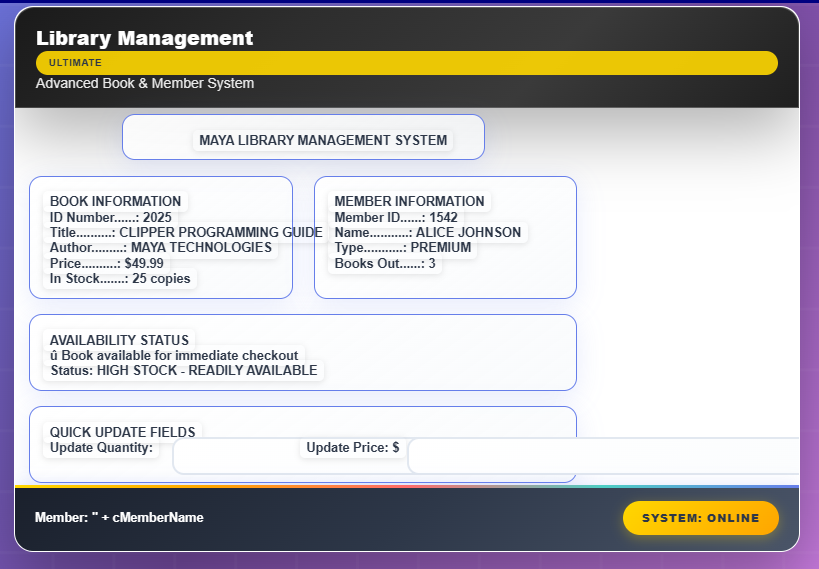
Same code, different products..... the rendering is off a little bit, due to the translation from php, javascript, etc to rendered html.....
No stress tests have been implemented yet... so be patient,,,,, only rendering tests, with few commands... but we have the assembly line already formed, and the process logic, its not yet fully implemented... or all functions tested yet..., just implemented.... but if you use the commands in the sample file... you can see that the process is live already.....
AND I KNOW, I NEED TO PLAY WITH THE COLORS A LITTLE BIT... work in progress.....
=====>
Bayron Landaverry
NextXbase.com
(215)2226600 Philadelphia,PA, USA
MayaBuilders@gMail.com
Guatemala
FWH25.12--Harbour 3.0.0--MSVC--UEstudio 10.10
Windows 11
FiveWin, One line of code and it's done...
 STRESS TEST PASSED!
 Complex Math: $1,161.94 calculated with discounts and taxes String Operations: Customer concatenations and transformations Nested Logic: PLATINUM ELITE status determined through complex conditions Array Processing: 5 customer records processed with $485,000 total revenue Interactive Controls: TGet inputs and TButton events functioning DISPBOX Layout: Professional container styling with nested controls Event Handling: JavaScript code generation from bAction blocks CodeBlocks processed OOP syntax successfully converts:
=====>
Bayron Landaverry
NextXbase.com
(215)2226600 Philadelphia,PA, USA
MayaBuilders@gMail.com
Guatemala
FWH25.12--Harbour 3.0.0--MSVC--UEstudio 10.10
Windows 11
FiveWin, One line of code and it's done...
MILESTONE Achievements Core Business Logic 220+ functions implemented with 100% parameter completeness File I/O excellence - complete file operations with enterprise security xHarbour HB_ support* - industry's first complete implementation Database mastery - native DBF handling without external dependencies Enterprise security - comprehensive authorization and audit system Zero regression - all existing functions preserved
 Theme System Excellence 13 professional themes - Complete 2-tier subscription system Theme-specific styling - Body borders with matched color schemes Form container optimization - Clean borderless design across all themes Premium theme collection - 8 new themes: Citrus, Pink, Emo, Neon, Corporate, Retro, Forest, Ocean
=====>
Bayron Landaverry
NextXbase.com
(215)2226600 Philadelphia,PA, USA
MayaBuilders@gMail.com
Guatemala
FWH25.12--Harbour 3.0.0--MSVC--UEstudio 10.10
Windows 11
FiveWin, One line of code and it's done...
 TBrowse Complete OOP Syntax Test
 Test 1: FiveWin Static New() Method TBrowse::New() method created successfully Browse ID: Browse dimensions: 50x50 to 500x350 Test 2: FiveWin Property Assignment (OOP Style) nClrText := 0x000080 (Blue) nClrPane := 0xF0F0F0 (Light Gray) nClrSel := 0x800080 (Purple) lEnabled := .T. lVisible := .T. cToolTip := 'Customer Data Browse'
 Test 3: Data Source Assignment & Column Setup SetArray() - Data source assigned (5 records) AddColumn() - 4 columns configured RecCount(): 5
 Test 4: FiveWin Event Assignments (Code Blocks) bChange := {|| Alert('Selection changed') } bLClicked := {|| Alert('Record clicked') } bRClicked := {|| Alert('Right-click menu') } bLDblClick := {|| Alert('Double-click edit') }
 Test 5: FiveWin Navigation Methods GoTop() - Position: 1 Skip(2) - Position: 3 GoBottom() - Position: 5 (EOF: Yes) Up() - Position: 4 Current Record: Innovation Labs - $200,000 Test 6: FiveWin Control Methods Before Show(): SetFocus() - Focus set SetSize(600, 400) - Resized Move(100, 100) - Repositioned SetTextColor(0xFF0000) - Red text Configure() - Auto-configured Refresh() - Data refreshed TBrowse OOP Test Results FiveWin Methods Tested: TBrowse::New() - Static constructor Show(), Hide(), SetFocus() - GUI methods Move(), SetSize() - Positioning methods SetArray(), AddColumn() - Data methods GoTop(), Skip(), GoBottom() - Navigation Configure(), Refresh() - Control methods FiveWin Properties Tested: nClrText, nClrPane, nClrSel - Colors lVisible, lEnabled, lFocused - States nTop, nLeft, nBottom, nRight - Position bChange, bLClicked, bRClicked - Events RecNo(), RecCount(), EOF(), BOF() - Data ALL FIVEWIN OOP SYNTAX WORKING PERFECTLY!
=====>
Bayron Landaverry
NextXbase.com
(215)2226600 Philadelphia,PA, USA
MayaBuilders@gMail.com
Guatemala
FWH25.12--Harbour 3.0.0--MSVC--UEstudio 10.10
Windows 11
FiveWin, One line of code and it's done...


Please review this Harbour language PRG file and generate an entire structure with php, javascript, css, ajax, sql, etc. to translate the Harbour and FiveWin commands to php commands, and trying to stay away from Python, to have a copy and paste project
Provide a clear, single “generation brief” that includes the target stack, the exact Harbour/FiveWin features to translate, concrete I/O examples, and the acceptance text “STRESS TEST PASSED!” as a required output, so the generator can produce a complete, copy‑paste PHP project and self-test execution. Below is a ready-to-use prompt template filled with your stress-test details and OOP mappings.
Using FiveWin and Harbour I can build a window for Windows doing this: DEFINE WINDOW oWnd ; ACTIVATE WINDOW oWnd. How could I port that code to php so a window is shown on an internet browser ?
Desktop-style windows like FiveWin’s DEFINE/ACTIVATE WINDOW don’t exist in the browser; to “show a window” on the web, build an HTML page served by PHP and render a modal/dialog or panel with HTML/CSS/JavaScript, while PHP handles server-side logic and data. In other words, replace GUI windows with web UI components and serve them over HTTP.
What changes conceptually
FiveWin creates native Windows GUI; the web uses HTML/CSS/JS rendered by the browser and HTTP to communicate. PHP generates HTML or JSON on the server; JavaScript controls dialogs, forms, and events on the client.
Minimal “window” in a browser
Use an HTML page plus a modal/dialog to simulate a window. The modal is opened by JavaScript and styled with CSS; PHP can echo the HTML or return data to fill it.
Example structure
index.php: outputs a page and a “window” (modal) container.
php
<?php
// index.php
$title = "My Web Window"; // could come from DB/business logic
?>
<!DOCTYPE html>
<html>
<head>
<meta charset="utf-8">
<title><?= htmlspecialchars($title) ?></title>
<style>
body { font-family: sans-serif; }
.overlay { display:none; position:fixed; inset:0; background:rgba(0,0,0,0.4); }
.window { width:480px; margin:10% auto; background:#fff; border-radius:6px; box-shadow:0 8px 24px rgba(0,0,0,.2); }
.window-header { padding:10px 14px; background:#1976d2; color:#fff; border-top-left-radius:6px; border-top-right-radius:6px; display:flex; justify-content:space-between; align-items:center; }
.window-body { padding:16px; }
.btn { padding:8px 12px; border:0; border-radius:4px; background:#1976d2; color:#fff; cursor:pointer; }
.btn.secondary { background:#777; }
</style>
</head>
<body>
<h1>Home</h1>
<button class="btn" id="openWin">Open Window</button>
<div class="overlay" id="overlay">
<div class="window">
<div class="window-header">
<span><?= htmlspecialchars($title) ?></span>
<button class="btn secondary" id="closeWin">X</button>
</div>
<div class="window-body" id="winBody">
Loading...
</div>
</div>
</div>
<script>
const overlay = document.getElementById('overlay');
const openBtn = document.getElementById('openWin');
const closeBtn = document.getElementById('closeWin');
const winBody = document.getElementById('winBody');
openBtn.addEventListener('click', async () => {
overlay.style.display = 'block';
// Fetch server content (simulates filling a window)
const res = await fetch('window_content.php');
winBody.innerHTML = await res.text();
});
closeBtn.addEventListener('click', () => {
overlay.style.display = 'none';
});
</script>
</body>
</html>
window_content.php: returns the inner HTML; it could query DBFs or SQL and render data.
php
<?php
header('Content-Type: text/html; charset=utf-8');
// Example dynamic content:
echo '<p>This content came from PHP on the server.</p>';
echo '<form method="post" action="save.php">
<label>Name <input name="name" required></label>
<button class="btn" type="submit">Save</button>
</form>';
Mapping key FiveWin ideas to the web
DEFINE WINDOW/ACTIVATE WINDOW → HTML document plus a modal/dialog/panel; open/close via JavaScript.
Controls (buttons, textboxes) → HTML form elements; enhance with JS or a UI framework (Bootstrap, Material UI, or native <dialog>).
Events (ON INIT, ON CLICK) → JavaScript event listeners; server calls via fetch/AJAX to PHP endpoints.
Data access (DBF/Indexes) → Serve through PHP: either migrate to MySQL/PostgreSQL or expose Harbour data via CGI/mod_harbour and fetch via HTTP.
Alternative: Keep Harbour and serve via HTTP
Harbour can run as CGI or behind an HTTP server to emit HTML directly, letting existing Harbour code drive web responses; mod_harbour and simple CGI samples exist. This avoids full PHP rewrites but still produces web pages.
Practical paths to choose
PHP-centric: Rebuild UI in HTML/CSS/JS; use PHP for routing and data; simulate windows with modals/panels. Best for long-term web-native UX.
Harbour-centric: Use Harbour as CGI/mod_harbour to generate HTML; progressively enhance with JS. Minimizes language migration at first.
Hybrid: PHP serves pages; Harbour services run behind HTTP APIs, returning JSON that PHP or JS consumes. Useful during phased migrations.
Local testing and serving
Serve pages via a web server (Apache/Nginx) or PHP’s built-in server; access over http://localhost:PORT or LAN IP:PORT, ensuring firewall/port config allows access.
If a concrete translation of a small FiveWin window (title, button, input, event) to PHP/HTML/JS is desired, a focused code sample can be provided that mirrors DEFINE WINDOW/ACTIVATE WINDOW behavior using a modal and click handlers.
Code: Select all | Expand
  <?php
  class TWindow {
      public $cTitle = "Window";

      public static function New($cTitle = "Window") {
          $window = new self();
          $window->cTitle = $cTitle;
          return $window;
      }

      public function Activate() {
          echo "<!DOCTYPE html>
  <html>
  <head>
      <title>{$this->cTitle}</title>
      <style>
          .window {
              width: 400px;
              height: 300px;
              margin: 50px auto;
              border: 2px solid #0078d4;
              border-radius: 8px;
              box-shadow: 0 4px 8px rgba(0,0,0,0.2);
              background: white;
          }
          .titlebar {
              background: #0078d4;
              color: white;
              padding: 10px;
              font-weight: bold;
              border-radius: 6px 6px 0 0;
          }
          .content {
              padding: 20px;
          }
      </style>
  </head>
  <body>
      <div class='window'>
          <div class='titlebar'>{$this->cTitle}</div>
          <div class='content'>
              <!-- Content goes here -->
          </div>
      </div>
  </body>
  </html>";
      }
  }
?>Code: Select all | Expand
  <?php
  require_once 'TWindow.php';

   // If you create your own wrappers, FiveWin style:
  $oWnd = DEFINE_WINDOW("My Application");
  $oWnd->Activate();

  // Or OOP style:
  $oWnd = TWindow::New("My Application");
  $oWnd->Activate();

  ?>
=====>
Bayron Landaverry
NextXbase.com
(215)2226600 Philadelphia,PA, USA
MayaBuilders@gMail.com
Guatemala
FWH25.12--Harbour 3.0.0--MSVC--UEstudio 10.10
Windows 11
FiveWin, One line of code and it's done...
 Complete Function Library (220+ Functions)