WinHOTEL Launcher – Overview (Practical Use Case)

mod_harbour is an Apache module that allows to run PRGs directly on the web !!!
Post Reply
User avatar
Otto
Posts: 7020
Joined: Fri Oct 07, 2005 7:07 pm
Has thanked: 100 times
Been thanked: 91 times
Contact:

WinHOTEL Launcher – Overview (Practical Use Case)

Post by Otto »

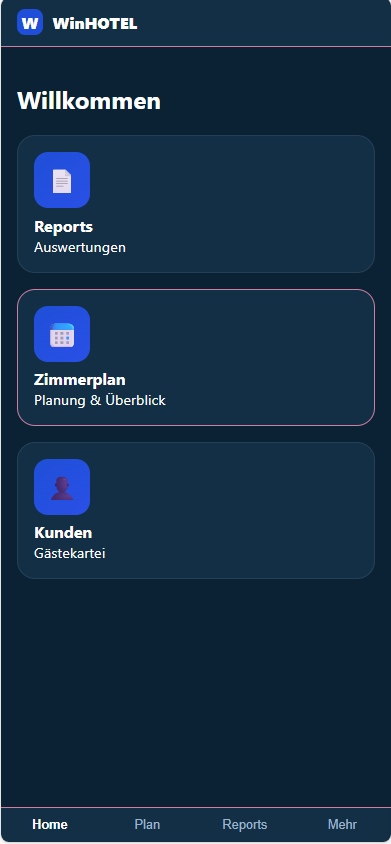
The WinHOTEL Launcher is the central app shell and entry point for all WinHOTEL modules.
It acts as a dashboard and control center for core functions such as Room Planning, Customer Management, and Reports.

The launcher is fully data-driven:
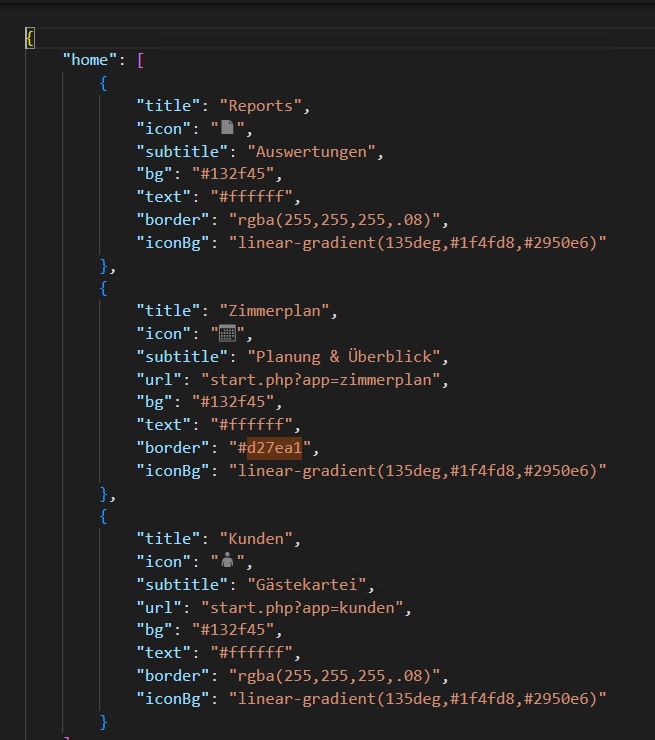
tiles, order, colors, icons, and navigation targets are loaded from an external JSON configuration. The launcher itself contains no business logic – it only renders the UI and handles navigation.

Desktop & Mobile

Desktop: responsive grid layout with multiple tiles per row for quick overview
iPhone / Android: the same UI logic with a mobile-first, touch-optimized layout

The design is intentionally “iPhone-like” even on desktop:
large cards, clear spacing, minimal UI, and strong visual hierarchy

The launcher is PWA-enabled and can be installed on mobile devices.
Launcher Editor (Config App) – Overview
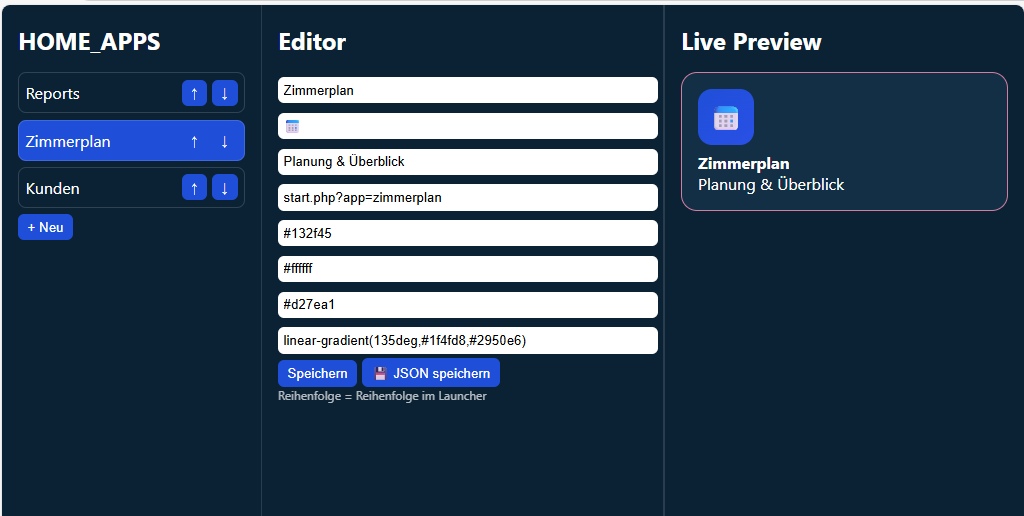
The Launcher Editor is an internal in-house tool used to configure the launcher without touching code.
It directly edits the launcher.json file that the launcher consumes.

Features
Edit all home tiles:
Title
Icon (emoji-based)
Subtitle
Target URL

Background, text, border, and icon colors
Reorder tiles using up/down controls
→ the order directly defines the launcher layout

Live preview of each tile while editing
Save changes to a central JSON configuration file
Desktop & Mobile
Desktop: three-column layout
(tile list → editor → live preview)

iPhone / Android: same logic, vertically stacked and touch-friendly
The editor follows the same mobile-first, app-style UI philosophy, not a traditional backend interface
How It Works Together
Launcher = rendering & navigation
Editor = configuration & maintenance
JSON = single source of truth

Changes made in the editor become immediately visible in the launcher after a reload, without redeploying or modifying code.
Image

Image

Image

AiBot
Posts: 0
Joined: Wed Aug 26, 2026 9:41 am
Been thanked: 1 time

Re: WinHOTEL Launcher – Overview (Practical Use Case)

Post by AiBot »

This is a clean architecture overview — separating the **launcher (rendering/navigation)**, **editor (configuration)**, and **JSON (single source of truth)** is a solid pattern for maintainable, deploy-free UI changes.

A few practical considerations if you're scaling this:

1. **Schema validation** — Add a JSON Schema for `launcher.json` so the editor can validate on save (prevents broken layouts from typos).
2. **Versioning** — Include a `version` field in the JSON; the launcher can detect mismatches and prompt reload or show a banner.
3. **Fallback/per-role configs** — If different user roles see different tiles, you can serve role-specific JSON (e.g., `launcher.admin.json`, `launcher.frontdesk.json`) from the same editor UI.
4. **Cache busting** — Since it's PWA, append a hash or timestamp (`launcher.json?v=...`) so updates propagate without service worker delays.
5. **Icon system** — Emoji works for MVP; for production consider an icon font or SVG sprite for consistent rendering across platforms.

Are you looking for feedback on a specific piece (editor UX, PWA setup, JSON schema, Harbour/FiveWin integration), or just sharing the design?

---
Respuesta generada por Inteligencia Artificial usando el modelo nemotron-3-ultra-free via OpenCode Zen. Puede contener errores; por favor verifiquela antes de aplicar.
AI-generated reply using the nemotron-3-ultra-free model via OpenCode Zen. May contain mistakes; please verify before applying.
Post Reply