Hi!,
Can you show me what error message you're getting?
C.

Hi!,
Can you show me what error message you're getting?
C.
Hi Carles,
With this hix.json I get
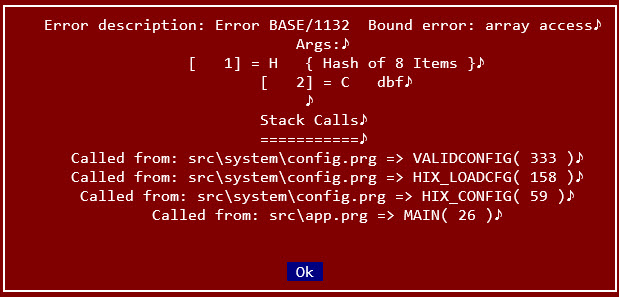
hua wrote: Fri Jun 26, 2026 4:30 amAnything wrong with this hix.json? Got a message error config file
TIA
Code: Select all | Expand
/* ------------------------------------
   Hix config file
   Harbour Web Server
  ------------------------------------- */
{
  "app":
  {
    "name": "HIX",
    "version": "1.3a",
    "compilation": "(r2603301842)"
  },
  "config":
  {
    "app_name": "MyApp 1.3a",
    "domain": "localhost",
    "https": false,
    "port": 80,
    "show_info": true,
    "path_root": "/",
    "index_root": false,
    "path_log": ".log",
    "path_tmp": ".tmp",
    "trace": false,
    "trace_view": false
  },
  "folders": [],
  "status": [],
  "routes": [],
  "loader": [],
  "ssl":
  {
    "cert_public": "",
    "cert_key": ""
  },
  "sets":
  {
    "dateformat": "dd/mm/yyyy",
    "decimals": 2,
    "deleted": false,
    "epoch": 1900,
    "exact": false,
    "exclusive": false,
    "fixed": false,
    "language": "EN",
    "softseek": false,
    "unique": false
  }
}
Can run without error if using hix.json that comes pre-installed with hix.
But if I pasted this in,
Code: Select all | Expand
  "routes": [
    { "route": "/", "action": "html/login.html" },
    { "route": "/register", "action": "html/register.html" },
    { "route": "/login_auth", "action": "login_auth.prg" },
    { "route": "/register_save", "action": "register_save.prg" },
    { "route": "/admin/dashboard", "action": "admin_dash.prg" },
    { "route": "/admin/user_status", "action": "user_status.prg" }
  ],
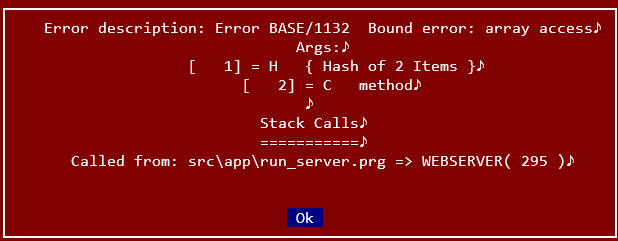
when I start hix, I'll get this
Code: Select all | Expand
/* ------------------------------------
   Hix config file
   Harbour Web Server
  ------------------------------------- */
{
  "app":
  {
    "name": "HIX",
    "version": "1.3a",
    "compilation": "(r2603301842)"
  },
  "config":
  {
    "app_name": "MyApp 1.3a",
    "domain": "localhost",
    "https": false,
    "port": 80,
    "show_info": true,
    "path_root": "/",
    "index_root": false,
    "path_log": ".log",
    "path_tmp": ".tmp",
    "trace": false,
    "trace_view": false
  },
  "folders": [],
  "status": [],
  "routes": [],
  "loader": [],
  "ssl":
  {
    "cert_public": "",
    "cert_key": ""
  },
  "sets":
  {
    "dateformat": "dd/mm/yyyy",
    "decimals": 2,
    "deleted": false,
    "epoch": 1900,
    "exact": false,
    "exclusive": false,
    "fixed": false,
    "language": "EN",
    "softseek": false,
    "unique": false
  },
  "dbf":
  {
    "rddname": "DBFCDX"
  },
  "upload":
  {
    "size": 1000000,
    "lifedays": 1,
    "garbage": 20000000,
    "allowed": ""
  },
  "sessions":
  {
    "path": ".sessions",
    "name": "USESSID",
    "prefix": "_sess",
    "seed": "HiX@2025!",
    "duration": 3600,
    "lifedays": 3,
    "garbage": 1000,
    "crypt": false
  },
  "firewall":
  {
    "activate": false,
    "type": "B",
    "list": []
  }
}
Hi,
A route must have a method in every route, which is usually either GET or POST. You must specify this method in the JSON, for example:
{ "route": "/", "action": "html/login.html", "method": "GET" },...
If you don't know which method to use (understanding this concept is essential in web development), you can specify both:
{ "route": "/register_save", "action": "register_save.prg", "method": "GET,POST" },...
Try making these changes and let me know...
C.
Carles wrote: Fri Jun 26, 2026 8:05 amHi,
Every route must have a method, which is usually either GET or POST. You must specify this method in the JSON, for example:
{ "route": "/", "action": "html/login.html", "method": "GET" },...
If you don't know which method to use (understanding this concept is essential in web development), you can specify both:
{ "route": "/register_save", "action": "register_save.prg", "method": "GET,POST" },...
Try making these changes and let me know...
C.
Thank you
Adding "method" to route fix the issue.
Where can I read more on configuration in hix.json?
I am also facing 404 error on a login form created for my test.
I am not sure what i have overlooked. All the files were created using gemini but it's still not working
Hi,
There is no information about hix.json. It's a configuration file that HIX handles through its own configuration options. If you want to let the AI configure the JSON, you'll need to see what each program option does when you configure it and the resulting JSON file.
C.
Previous error was because AI assume I was on Linux so generated hix.json with end of line marker LF instead of CRLF.
So now no more directly editing hix.json but am changing settings within hix.exe itself.
Now a new mystery to me. In the folder where hix.exe is I created a sub-folder called app and placed index.html here.
I then set Path Root to app. Why browsing localhost shows Hix startup page instead of my landing page app/index.html?
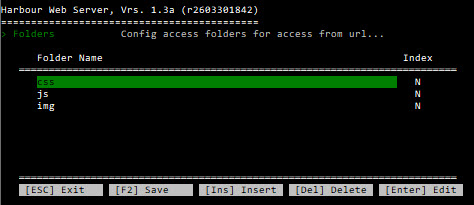
Inside app I created a few sub-folders; css, img but when I start hix it says css, img don't exist
TIA
Hi,
Put a simple html (10 lines) and i will try this afternoon...
Thanks
C.
xxxxx.yyyyy.com -> loads Hix default web page
xxxxx.yyyyyy.com/app -> returns 404
xxxxx.yyyyyy.com/app/index.html -> load the landing page correctly
Code: Select all | Expand
 {
    "app_name": "My App",
    "domain": "xxxxx.yyyyy.com",
    "https": false,
    "port": 80,
    "show_info": true,
    "path_root": "app",
    "index_root": false,
    "path_log": ".log",
    "path_tmp": ".tmp",
    "trace": true,
    "trace_view": false
  },
Hua,
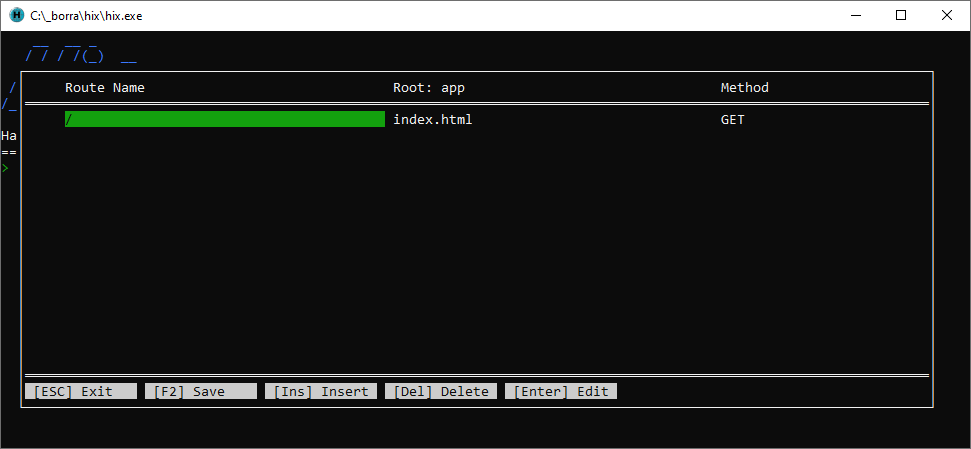
Define a route to the root directory and it should work.
C.
Thank you Carles.
The only error remaining for now is this whenever I start the web server:
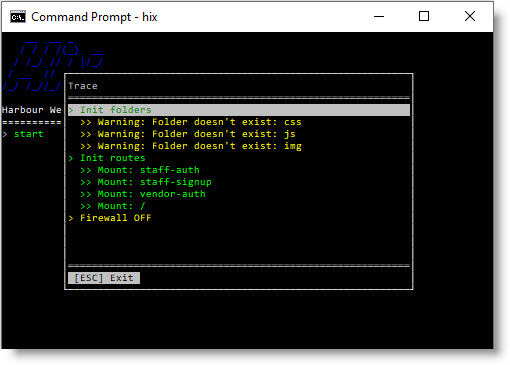
But the sub-folders do exist in app folder:
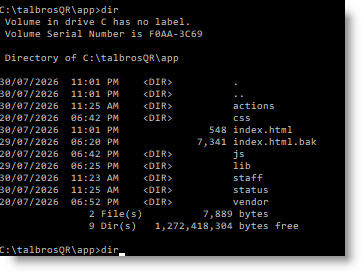
Code: Select all | Expand
  "folders":
  [
    {
      "name": "css",
      "index": false
    },
    {
      "name": "js",
      "index": false
    },
    {
      "name": "img",
      "index": false
    }
  ],
Hua,
When you define a folder, it's relative to the server's directory.
If you define folder -> js, this folder is located in the server's directory.
If you define folder -> app/js, this folder is located in the server's directory + /app/js.
This is because you can enable a folder, for example, for data, reports, etc., independently of the web application's code.
Try defining folder -> app/js, folder -> app/css, etc.
C.

Dear Carles,
How to connect to Mariadb or MySql server?
Thanks in advance,
