Hablando de un generador de Reportes para FWH
-
Otto

- Posts: 7020
- Joined: Fri Oct 07, 2005 7:07 pm
- Has thanked: 100 times
- Been thanked: 91 times
- Contact:
Re: Hablando de un generador de Reportes para FWH
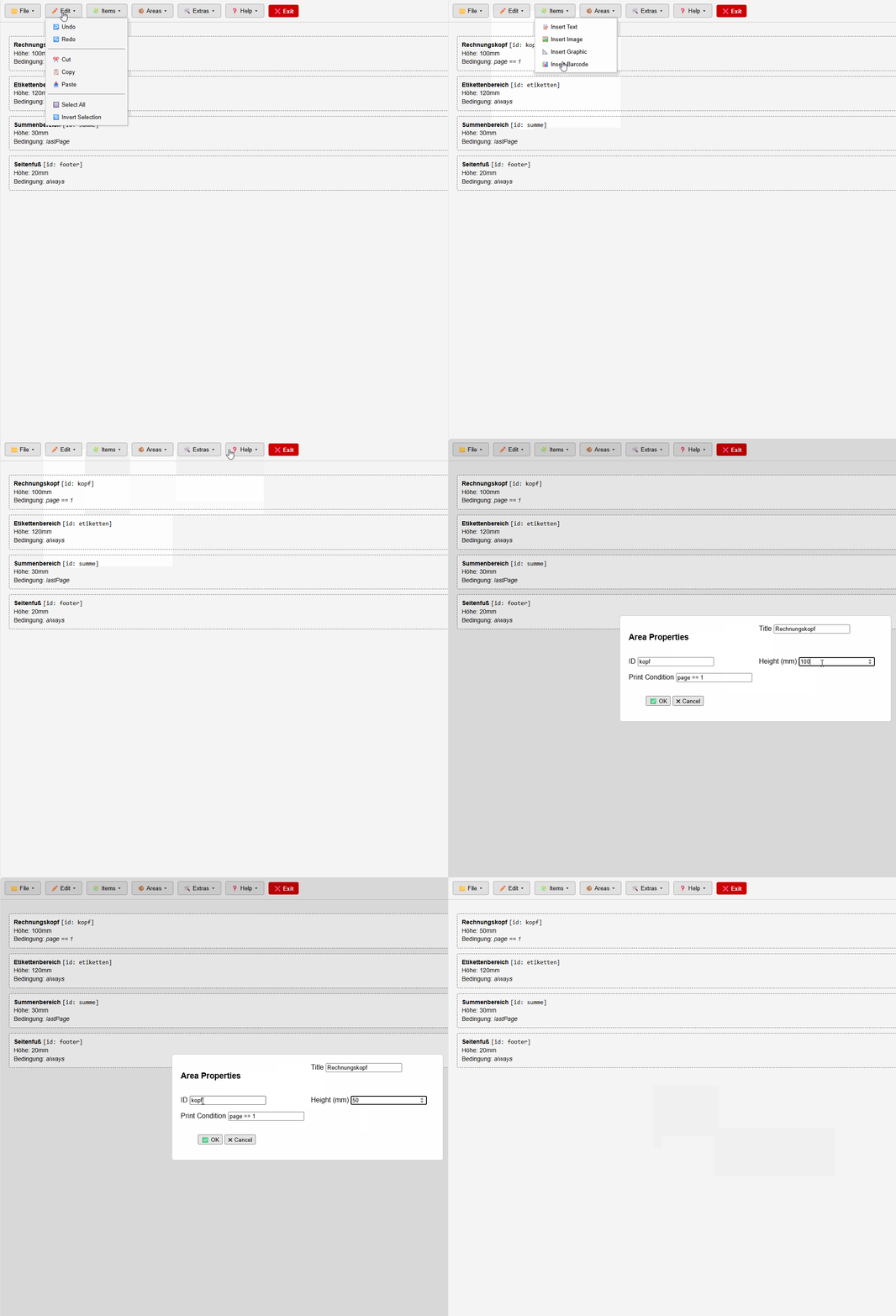
The discussion here has given me a good idea. I will now recreate exactly the functionality of ER, but based on HTML.
-
Silvio.Falconi

- Posts: 7348
- Joined: Thu Oct 18, 2012 7:17 pm
- Has thanked: 2 times
- Been thanked: 75 times
Re: Hablando de un generador de Reportes para FWH
Otto i think you go out of the topic , here Simeone asked report Designer NO HTMLOtto wrote: Fri May 16, 2025 6:52 pm Hello,
everything is now running from the portable USB stick version.
A Harbour launcher calls the CMD file that starts the PHP server and the report.
I'll post a video again so you can see the speed. (only if you're interested)
Best regards,
Otto
Harbour-LauncherEin Batch-basiertes Startskript zur dynamischen Portzuweisung und Initialisierung eines lokalen PHP-Webservers mit anschließendem Start einer Browser-Ansicht im App-Modus.Code: Select all | Expand
PROCEDURE Main() ShellExecute( 0, "open", "HTMLReports.cmd", "", "", 0 ) // SW_HIDE = 0 MsgRun( "Bitte warten...", "Starte Etiketten-App...", { || Sleep(3000) } ) // Alternativ: Fenster mit Bild anzeigen, dann automatisch schließen RETURNCode: Select all | Expand
@echo off
cd /d %~dp0
setlocal enabledelayedexpansion

set PHP_EXE=php\php.exe
set STARTPORT=8031
set MAXPORT=8100

REM Freien Port suchen
set PORT=%STARTPORT%

:find_free_port
netstat -ano | findstr :%PORT% >nul
if %errorlevel%==0 (
    set /a PORT+=1
    if !PORT! GTR %MAXPORT% (
        echo Kein freier Port zwischen %STARTPORT% und %MAXPORT% gefunden.
        pause
        exit /b
    )
    goto find_free_port
)

echo Verwende Port !PORT!

REM PHP-Server starten
start "" /min "%PHP_EXE%" -S 127.0.0.1:!PORT! -t www

REM Browser im App-Modus starten
timeout /t 1 >nul
 start "" "msedge.exe" --app="http://127.0.0.1:!PORT!/\reports/neu2.html"


endlocal
Since from 1991/1992 ( fw for clipper Rel. 14.4 - Momos)
I use : FiveWin for Harbour March-April 2024 - Harbour 3.2.0dev (harbour_bcc770_32_20240309) - Bcc7.70 - xMate ver. 1.15.3 - PellesC - mail: silvio[dot]falconi[at]gmail[dot]com
I use : FiveWin for Harbour March-April 2024 - Harbour 3.2.0dev (harbour_bcc770_32_20240309) - Bcc7.70 - xMate ver. 1.15.3 - PellesC - mail: silvio[dot]falconi[at]gmail[dot]com
-
Silvio.Falconi
- Posts: 7348
- Joined: Thu Oct 18, 2012 7:17 pm
- Has thanked: 2 times
- Been thanked: 75 times
Re: Hablando de un generador de Reportes para FWH
Otto,
Use this mini report Designer in html
Use this mini report Designer in html
Code: Select all | Expand
<!DOCTYPE html><html lang="it">
<head>
  <meta charset="UTF-8">
  <title>Report Designer Avanzato</title>
  <style>
    body {
      font-family: sans-serif;
      margin: 0;
      overflow: hidden;
    }
    #toolbar {
      background: #f0f0f0;
      padding: 10px;
      display: flex;
      gap: 10px;
      border-bottom: 1px solid #ccc;
      position: fixed;
      width: 100%;
      top: 0;
      z-index: 10;
    }
    #workspace {
      position: absolute;
      top: 50px;
      left: 0;
      right: 0;
      bottom: 0;
      overflow: auto;
    }
    #canvas {
      background: white;
      border: 1px solid #ccc;
      margin: 20px;
      transform-origin: 0 0;
    }
    input[type="file"] {
      display: none;
    }
  </style>
</head>
<body>  <div id="toolbar">
    <button onclick="setTool('hline')">Linea Orizzontale</button>
    <button onclick="setTool('vline')">Linea Verticale</button>
    <button onclick="setTool('rect')">Box</button>
    <button onclick="setTool('label')">Label</button>
    <button onclick="triggerImageUpload()">Immagine</button>
    <button onclick="setTool('select')">Seleziona/Modifica</button>
    <button onclick="deleteSelected()">Elimina</button>
    <button onclick="downloadXML()">Salva XML</button>
    <button onclick="uploadXML()">Carica XML</button>
    <button onclick="toggleZoom()">Zoom</button>
    <input type="file" id="imgInput" accept="image/*" onchange="handleImage(event)">
    <input type="file" id="xmlInput" accept=".xml" onchange="handleXML(event)">
  </div>  <div id="workspace">
    <canvas id="canvas" width="794" height="1123"></canvas>
  </div>  <script>
    const canvas = document.getElementById('canvas');
    const ctx = canvas.getContext('2d');
    const imgInput = document.getElementById('imgInput');
    const xmlInput = document.getElementById('xmlInput');
    let tool = 'select';
    let elements = [];
    let drawing = false;
    let startX, startY;
    let selected = null;
    let dragging = false;
    let resizing = false;
    let zoom = 1;

    function setTool(t) {
      tool = t;
      selected = null;
    }

    function triggerImageUpload() {
      imgInput.click();
    }

    function uploadXML() {
      xmlInput.click();
    }

    function toggleZoom() {
      zoom = zoom === 1 ? 1.5 : 1;
      canvas.style.transform = `scale(${zoom})`;
    }

    function drawAll() {
      ctx.clearRect(0, 0, canvas.width, canvas.height);
      for (const el of elements) {
        drawElement(el);
      }
      if (selected) drawSelectionBox(selected);
    }

    function drawElement(el) {
      ctx.save();
      if (el.type === 'line') {
        ctx.beginPath();
        ctx.moveTo(el.x1, el.y1);
        ctx.lineTo(el.x2, el.y2);
        ctx.stroke();
      } else if (el.type === 'rect') {
        ctx.strokeRect(el.x, el.y, el.width, el.height);
      } else if (el.type === 'label') {
        ctx.fillText(el.text, el.x, el.y);
      } else if (el.type === 'image') {
        const img = new Image();
        img.src = el.src;
        img.onload = () => {
          ctx.drawImage(img, el.x, el.y, el.width, el.height);
        };
      }
      ctx.restore();
    }

    function drawSelectionBox(el) {
      ctx.save();
      ctx.setLineDash([5, 5]);
      if (el.type === 'line') {
        ctx.strokeRect(Math.min(el.x1, el.x2), Math.min(el.y1, el.y2), Math.abs(el.x2 - el.x1), Math.abs(el.y2 - el.y1));
      } else {
        ctx.strokeRect(el.x, el.y, el.width, el.height);
      }
      ctx.restore();
    }

    canvas.addEventListener('mousedown', (e) => {
      const rect = canvas.getBoundingClientRect();
      const x = (e.clientX - rect.left) / zoom;
      const y = (e.clientY - rect.top) / zoom;
      startX = x; startY = y;
      drawing = true;

      if (tool === 'select') {
        selected = elements.find(el => isInside(el, x, y));
        if (selected) dragging = true;
        drawAll();
      } else if (tool === 'hline') {
        elements.push({ type: 'line', x1: x, y1: y, x2: x + 100, y2: y });
        drawAll();
      } else if (tool === 'vline') {
        elements.push({ type: 'line', x1: x, y1: y, x2: x, y2: y + 100 });
        drawAll();
      } else if (tool === 'rect') {
        selected = { type: 'rect', x, y, width: 0, height: 0 };
        elements.push(selected);
      } else if (tool === 'label') {
        const text = prompt("Testo della label:");
        if (text) elements.push({ type: 'label', x, y, text });
        drawAll();
      }
    });

    canvas.addEventListener('mousemove', (e) => {
      if (!drawing) return;
      const rect = canvas.getBoundingClientRect();
      const x = (e.clientX - rect.left) / zoom;
      const y = (e.clientY - rect.top) / zoom;

      if (tool === 'select' && dragging && selected) {
        if (selected.type === 'line') {
          const dx = x - startX;
          const dy = y - startY;
          selected.x1 += dx;
          selected.y1 += dy;
          selected.x2 += dx;
          selected.y2 += dy;
        } else {
          selected.x += x - startX;
          selected.y += y - startY;
        }
        startX = x; startY = y;
        drawAll();
      } else if (tool === 'rect' && selected) {
        selected.width = x - selected.x;
        selected.height = y - selected.y;
        drawAll();
      }
    });

    canvas.addEventListener('mouseup', () => {
      drawing = false;
      dragging = false;
      selected = null;
    });

    function isInside(el, x, y) {
      if (el.type === 'line') {
        const minX = Math.min(el.x1, el.x2) - 3;
        const maxX = Math.max(el.x1, el.x2) + 3;
        const minY = Math.min(el.y1, el.y2) - 3;
        const maxY = Math.max(el.y1, el.y2) + 3;
        return x >= minX && x <= maxX && y >= minY && y <= maxY;
      } else {
        return x >= el.x && x <= el.x + el.width && y >= el.y && y <= el.y + el.height;
      }
    }

    function deleteSelected() {
      if (selected) {
        elements = elements.filter(el => el !== selected);
        selected = null;
        drawAll();
      }
    }

    function handleImage(e) {
      const file = e.target.files[0];
      if (!file) return;
      const reader = new FileReader();
      reader.onload = (ev) => {
        const src = ev.target.result;
        const img = new Image();
        img.onload = () => {
          elements.push({ type: 'image', x: 50, y: 50, width: img.width / 2, height: img.height / 2, src });
          drawAll();
        };
        img.src = src;
      };
      reader.readAsDataURL(file);
    }

    function downloadXML() {
      let xml = `<report>\n`;
      elements.forEach(el => {
        if (el.type === 'line') {
          xml += `  <line x1="${el.x1}" y1="${el.y1}" x2="${el.x2}" y2="${el.y2}"/>\n`;
        } else if (el.type === 'rect') {
          xml += `  <rect x="${el.x}" y="${el.y}" width="${el.width}" height="${el.height}"/>\n`;
        } else if (el.type === 'label') {
          xml += `  <label x="${el.x}" y="${el.y}">${el.text}</label>\n`;
        } else if (el.type === 'image') {
          xml += `  <image x="${el.x}" y="${el.y}" width="${el.width}" height="${el.height}" src="${el.src}"/>\n`;
        }
      });
      xml += `</report>`;
      const blob = new Blob([xml], { type: 'application/xml' });
      const link = document.createElement('a');
      link.href = URL.createObjectURL(blob);
      link.download = 'report.xml';
      link.click();
    }

    function handleXML(e) {
      const file = e.target.files[0];
      if (!file) return;
      const reader = new FileReader();
      reader.onload = (ev) => {
        const parser = new DOMParser();
        const xml = parser.parseFromString(ev.target.result, 'application/xml');
        elements = [];
        xml.querySelectorAll('line').forEach(n => {
          elements.push({
            type: 'line',
            x1: parseFloat(n.getAttribute('x1')),
            y1: parseFloat(n.getAttribute('y1')),
            x2: parseFloat(n.getAttribute('x2')),
            y2: parseFloat(n.getAttribute('y2')),
          });
        });
        xml.querySelectorAll('rect').forEach(n => {
          elements.push({
            type: 'rect',
            x: parseFloat(n.getAttribute('x')),
            y: parseFloat(n.getAttribute('y')),
            width: parseFloat(n.getAttribute('width')),
            height: parseFloat(n.getAttribute('height')),
          });
        });
        xml.querySelectorAll('label').forEach(n => {
          elements.push({
            type: 'label',
            x: parseFloat(n.getAttribute('x')),
            y: parseFloat(n.getAttribute('y')),
            text: n.textContent
          });
        });
        xml.querySelectorAll('image').forEach(n => {
          elements.push({
            type:
Since from 1991/1992 ( fw for clipper Rel. 14.4 - Momos)
I use : FiveWin for Harbour March-April 2024 - Harbour 3.2.0dev (harbour_bcc770_32_20240309) - Bcc7.70 - xMate ver. 1.15.3 - PellesC - mail: silvio[dot]falconi[at]gmail[dot]com
I use : FiveWin for Harbour March-April 2024 - Harbour 3.2.0dev (harbour_bcc770_32_20240309) - Bcc7.70 - xMate ver. 1.15.3 - PellesC - mail: silvio[dot]falconi[at]gmail[dot]com
-
Silvio.Falconi
- Posts: 7348
- Joined: Thu Oct 18, 2012 7:17 pm
- Has thanked: 2 times
- Been thanked: 75 times
Re: Hablando de un generador de Reportes para FWH
Code: Select all | Expand
[<!DOCTYPE html>
<html lang="it">
<head>
  <meta charset="UTF-8">
  <title>Report Designer Avanzato</title>
  <style>
    body {
      margin: 0;
      font-family: sans-serif;
      overflow: hidden;
    }

    #toolbar {
      background: #eee;
      padding: 10px;
      display: flex;
      gap: 10px;
      align-items: center;
      border-bottom: 1px solid #ccc;
    }

    #container {
      overflow: scroll;
      width: 100vw;
      height: calc(100vh - 50px);
      background: #ddd;
    }

    canvas {
      background: white;
      display: block;
      margin: 20px auto;
      border: 1px solid #aaa;
      transform-origin: top left;
    }

    input[type="file"] {
      display: none;
    }

    .selected {
      outline: 2px dashed red;
    }
  </style>
</head>
<body>

  <div id="toolbar">
    <button onclick="setTool('hline')">Linea Orizzontale</button>
    <button onclick="setTool('vline')">Linea Verticale</button>
    <button onclick="setTool('rect')">Box</button>
    <button onclick="setTool('label')">Label</button>
    <button onclick="triggerImageUpload()">Immagine</button>
    <button onclick="setTool('move')">Sposta/Ridimensiona</button>
    <button onclick="deleteSelected()">Elimina</button>
    <button onclick="zoomIn()">Zoom +</button>
    <button onclick="zoomOut()">Zoom -</button>
    <button onclick="downloadXML()">Salva XML</button>
    <button onclick="uploadXML()">Carica XML</button>
    <input type="file" id="imgInput" accept="image/*" onchange="handleImage(event)">
    <input type="file" id="xmlInput" accept=".xml" onchange="loadXML(event)">
  </div>

  <div id="container">
    <canvas id="canvas" width="794" height="1123"></canvas>
  </div>

  <script>
    const canvas = document.getElementById("canvas");
    const ctx = canvas.getContext("2d");
    const imgInput = document.getElementById("imgInput");
    const xmlInput = document.getElementById("xmlInput");

    let tool = "hline";
    let elements = [];
    let scale = 1;

    let drawing = false;
    let dragging = false;
    let resizing = false;
    let startX, startY;
    let selectedIndex = -1;

    function setTool(t) {
      tool = t;
      selectedIndex = -1;
      redraw();
    }

    function triggerImageUpload() {
      imgInput.click();
    }

    function uploadXML() {
      xmlInput.click();
    }

    function zoomIn() {
      scale *= 1.2;
      updateZoom();
    }

    function zoomOut() {
      scale /= 1.2;
      updateZoom();
    }

    function updateZoom() {
      canvas.style.transform = `scale(${scale})`;
    }

    function redraw() {
      ctx.clearRect(0, 0, canvas.width, canvas.height);
      elements.forEach((el, index) => {
        drawElement(el, index === selectedIndex);
      });
    }

    function drawElement(el, selected = false) {
      ctx.save();
      if (selected) {
        ctx.strokeStyle = "red";
        ctx.lineWidth = 2;
      } else {
        ctx.strokeStyle = "black";
        ctx.lineWidth = 1;
      }

      if (el.type === "line") {
        ctx.beginPath();
        ctx.moveTo(el.x1, el.y1);
        ctx.lineTo(el.x2, el.y2);
        ctx.stroke();
      } else if (el.type === "rect") {
        ctx.strokeRect(el.x, el.y, el.width, el.height);
      } else if (el.type === "label") {
        ctx.font = "16px sans-serif";
        ctx.fillText(el.text, el.x, el.y);
      } else if (el.type === "image") {
        const img = new Image();
        img.onload = () => {
          ctx.drawImage(img, el.x, el.y, el.width, el.height);
        };
        img.src = el.src;
      }
      ctx.restore();
    }

    function hitTest(x, y) {
      return elements.findIndex((el) => {
        if (el.type === "line") {
          const dx = el.x2 - el.x1;
          const dy = el.y2 - el.y1;
          const len = Math.hypot(dx, dy);
          const proj = ((x - el.x1) * dx + (y - el.y1) * dy) / len ** 2;
          if (proj < 0 || proj > 1) return false;
          const closestX = el.x1 + proj * dx;
          const closestY = el.y1 + proj * dy;
          return Math.hypot(x - closestX, y - closestY) < 5;
        } else if (el.type === "rect" || el.type === "image") {
          return x >= el.x && x <= el.x + el.width && y >= el.y && y <= el.y + el.height;
        } else if (el.type === "label") {
          return x >= el.x && x <= el.x + 100 && y >= el.y - 16 && y <= el.y;
        }
        return false;
      });
    }

    canvas.addEventListener("mousedown", (e) => {
      const rect = canvas.getBoundingClientRect();
      const x = (e.clientX - rect.left) / scale;
      const y = (e.clientY - rect.top) / scale;

      if (tool === "move") {
        const idx = hitTest(x, y);
        if (idx !== -1) {
          selectedIndex = idx;
          dragging = true;
          startX = x;
          startY = y;
        } else {
          selectedIndex = -1;
        }
        redraw();
        return;
      }

      drawing = true;
      startX = x;
      startY = y;

      if (tool === "hline") {
        elements.push({ type: "line", x1: x, y1: y, x2: x + 100, y2: y });
        drawing = false;
      } else if (tool === "vline") {
        elements.push({ type: "line", x1: x, y1: y, x2: x, y2: y + 100 });
        drawing = false;
      } else if (tool === "label") {
        const text = prompt("Inserisci testo:");
        if (text) {
          elements.push({ type: "label", x, y, text });
        }
        drawing = false;
      }
      redraw();
    });

    canvas.addEventListener("mousemove", (e) => {
      if (!dragging) return;
      const rect = canvas.getBoundingClientRect();
      const x = (e.clientX - rect.left) / scale;
      const y = (e.clientY - rect.top) / scale;
      const dx = x - startX;
      const dy = y - startY;
      const el = elements[selectedIndex];
      if (el) {
        if (el.type === "line") {
          el.x1 += dx;
          el.x2 += dx;
          el.y1 += dy;
          el.y2 += dy;
        } else if (el.type === "rect" || el.type === "image") {
          el.x += dx;
          el.y += dy;
        } else if (el.type === "label") {
          el.x += dx;
          el.y += dy;
        }
      }
      startX = x;
      startY = y;
      redraw();
    });

    canvas.addEventListener("mouseup", (e) => {
      if (dragging) dragging = false;

      if (!drawing || tool !== "rect") return;
      const rect = canvas.getBoundingClientRect();
      const x = (e.clientX - rect.left) / scale;
      const y = (e.clientY - rect.top) / scale;
      const width = x - startX;
      const height = y - startY;
      elements.push({ type: "rect", x: startX, y: startY, width, height });
      drawing = false;
      redraw();
    });

    function handleImage(event) {
      const file = event.target.files[0];
      if (!file) return;
      const reader = new FileReader();
      reader.onload = function (e) {
        const img = new Image();
        img.onload = () => {
          elements.push({
            type: "image",
            x: 100,
            y: 100,
            width: img.width / 4,
            height: img.height / 4,
            src: e.target.result
          });
          redraw();
        };
        img.src = e.target.result;
      };
      reader.readAsDataURL(file);
    }

    function deleteSelected() {
      if (selectedIndex !== -1) {
        elements.splice(selectedIndex, 1);
        selectedIndex = -1;
        redraw();
      }
    }

    function downloadXML() {
      let xml = `<report>\n`;
      elements.forEach(el => {
        if (el.type === "line") {
          xml += `  <line x1="${el.x1}" y1="${el.y1}" x2="${el.x2}" y2="${el.y2}"/>\n`;
        } else if (el.type === "rect") {
          xml += `  <rect x="${el.x}" y="${el.y}" width="${el.width}" height="${el.height}"/>\n`;
        } else if (el.type === "label") {
          xml += `  <label x="${el.x}" y="${el.y}">${el.text}</label>\n`;
        } else if (el.type === "image") {
          xml += `  <image x="${el.x}" y="${el.y}" width="${el.width}" height="${el.height}" src="${el.src}"/>\n`;
        }
      });
      xml += `</report>`;
      const blob = new Blob([xml], { type: "application/xml" });
      const link = document.createElement("a");
      link.href = URL.createObjectURL(blob);
      link.download = "report.xml";
      link.click();
    }

    function loadXML(event) {
      const file = event.target.files[0];
      const reader = new FileReader();
      reader.onload = function (e) {
        const parser = new DOMParser();
        const xml = parser.parseFromString(e.target.result, "text/xml");
        elements = [];
        xml.querySelectorAll("line").forEach(line => {
          elements.push({
            type: "line",
            x1: +line.getAttribute("x1"),
            y1: +line.getAttribute("y1"),
            x2: +line.getAttribute("x2"),
            y2: +line.getAttribute("y2")
          });
        });
        xml.querySelectorAll("rect").forEach(rect => {
          elements.push({
            type: "rect",
            x: +rect.getAttribute("x"),
            y: +rect.getAttribute("y"),
            width: +rect.getAttribute("width"),
            height: +rect.getAttribute("height")
          });
        });
        xml.querySelectorAll("label").forEach(label => {
          elements.push({
            type: "label",
            x: +label.getAttribute("x"),
            y: +label.getAttribute("y"),
            text: label.textContent
          });
        });
        xml.querySelectorAll("image").forEach(img => {
          elements.push({
            type: "image",
            x: +img.getAttribute("x"),
            y: +img.getAttribute("y"),
            width: +img.getAttribute("width"),
            height: +img.getAttribute("height"),
            src: img.getAttribute("src")
          });
        });
        redraw();
      };
      reader.readAsText(file);
    }
  </script>

</body>
</html>


code]
Since from 1991/1992 ( fw for clipper Rel. 14.4 - Momos)
I use : FiveWin for Harbour March-April 2024 - Harbour 3.2.0dev (harbour_bcc770_32_20240309) - Bcc7.70 - xMate ver. 1.15.3 - PellesC - mail: silvio[dot]falconi[at]gmail[dot]com
I use : FiveWin for Harbour March-April 2024 - Harbour 3.2.0dev (harbour_bcc770_32_20240309) - Bcc7.70 - xMate ver. 1.15.3 - PellesC - mail: silvio[dot]falconi[at]gmail[dot]com
-
Otto
- Posts: 7020
- Joined: Fri Oct 07, 2005 7:07 pm
- Has thanked: 100 times
- Been thanked: 91 times
- Contact:
Re: Hablando de un generador de Reportes para FWH
Thank you, Silvio. I think I will build the designer just like EasyReport, with areas and items. Your functions will then be very useful in the item section.
Best regards,
Otto
Best regards,
Otto
-
Silvio.Falconi
- Posts: 7348
- Joined: Thu Oct 18, 2012 7:17 pm
- Has thanked: 2 times
- Been thanked: 75 times
Re: Hablando de un generador de Reportes para FWH
Easyreport not work ....
I can't make you understand why easyreport doesn't work well, I mean I've never used it, I tried to explain to Timm Soltdabert what didn't work but he didn't understand me either, then when I saw the sources I understood why it didn't work well. I'll explain briefly when you have to move an object for example a box or a label in an area you see the hand or the arrow cursor and you see the dots but in reality the box formed by the dots is not in the right place and you have a lot of difficulty moving and stopping all the controls in line and each area doesn't have a powerful zoom and for those people who have vision problems like me they have a lot of difficulty. Looking at the sources of easyreport Timm made a huge mistake, he had to make a mother class for example TElement and then many child object classes for the boxes, lines and labels instead he supports himself with the Tcontrol as a mother class and it's wrong. If you build a designer from easyreport you'll only waste time
I can't make you understand why easyreport doesn't work well, I mean I've never used it, I tried to explain to Timm Soltdabert what didn't work but he didn't understand me either, then when I saw the sources I understood why it didn't work well. I'll explain briefly when you have to move an object for example a box or a label in an area you see the hand or the arrow cursor and you see the dots but in reality the box formed by the dots is not in the right place and you have a lot of difficulty moving and stopping all the controls in line and each area doesn't have a powerful zoom and for those people who have vision problems like me they have a lot of difficulty. Looking at the sources of easyreport Timm made a huge mistake, he had to make a mother class for example TElement and then many child object classes for the boxes, lines and labels instead he supports himself with the Tcontrol as a mother class and it's wrong. If you build a designer from easyreport you'll only waste time
Since from 1991/1992 ( fw for clipper Rel. 14.4 - Momos)
I use : FiveWin for Harbour March-April 2024 - Harbour 3.2.0dev (harbour_bcc770_32_20240309) - Bcc7.70 - xMate ver. 1.15.3 - PellesC - mail: silvio[dot]falconi[at]gmail[dot]com
I use : FiveWin for Harbour March-April 2024 - Harbour 3.2.0dev (harbour_bcc770_32_20240309) - Bcc7.70 - xMate ver. 1.15.3 - PellesC - mail: silvio[dot]falconi[at]gmail[dot]com
-
Otto
- Posts: 7020
- Joined: Fri Oct 07, 2005 7:07 pm
- Has thanked: 100 times
- Been thanked: 91 times
- Contact:
Re: Hablando de un generador de Reportes para FWH
Hello Silvio,
thank you for your feedback on EasyReport – I understand your criticism well, especially regarding the handling and the lack of a zoom function.
I'm currently taking a different approach: I'm redeveloping EasyReport as a web application, completely without traditional OOP. Instead, I'm using a patcher and preprocessor that generates finished HTML/JS code from simple blocks and JSON structures.
Advantages:
* No cursor issues
* Debugging directly in the browser
* Platform-independent and lightweight
I'm deliberately not adopting EasyReport’s desktop logic with TControl.
Best regards,
Otto
thank you for your feedback on EasyReport – I understand your criticism well, especially regarding the handling and the lack of a zoom function.
I'm currently taking a different approach: I'm redeveloping EasyReport as a web application, completely without traditional OOP. Instead, I'm using a patcher and preprocessor that generates finished HTML/JS code from simple blocks and JSON structures.
Advantages:
* No cursor issues
* Debugging directly in the browser
* Platform-independent and lightweight
I'm deliberately not adopting EasyReport’s desktop logic with TControl.
Best regards,
Otto
-
albeiroval

- Posts: 400
- Joined: Tue Oct 16, 2007 5:51 pm
- Location: Barquisimeto - Venezuela
- Been thanked: 2 times
Re: Hablando de un generador de Reportes para FWH
cnavarro wrote: Thu May 15, 2025 11:07 amjose_murugosa wrote: Wed May 14, 2025 6:12 pmPersonalmente quisiera ver fastreport.net en 32 y 64 bits gratuito, que está en desarrollo por Cristóbal, creo que es una opción super interesante y mucha gente del foro ha usado fastreport alguna vez.
Yo estaría dispuesto a hacer una contribución apostando a ese proyecto.
Bien, recordar que existe un servidor en discord para este tema:
https://discord.gg/636uEet3
Dicho esto, es mi objetivo que para la primera semana de Junio publique la primera version, por fin, si no he podido antes, ya que quiero terminar las nuevas funcionalidades que estoy integrando en FivEdit, que como he dicho en el canal de discord de fivedit han de estar publicadas esta semana, y retome el tema de FastReport NET que es un proyecto que me ilusiona mucho y que tengo muy avanzado
Las principales novedades las ire poniendo en discord, aunque por supuesto, tambien hare mencion en este foro
Jose, este comentario ponlo en el canal de Discord, porque ya ha habido alguna sugerencia al respecto y podremos hablarlo mas profundamenteOkay, remember there's a Discord server for this topic:
https://discord.gg/636uEet3
That said, my goal is to finally publish the first version by the first week of June, if I haven't been able to before, since I want to finish the new features I'm integrating into FivEdit, which, as I said in the FiveDit Discord channel, should be published this week. I also want to get back to the FastReport NET project, which is a project I'm very excited about and well advanced.
I'll be posting the main updates on Discord, although of course, I'll also mention them in this forum.
Jose, please post this comment on the Discord channel, because there have already been some suggestions about it and we can discuss it in more depth.
Thanks

Como va el avance de Fastreport .Net ? Habra algo para ver ?
-
cnavarro

- Posts: 6763
- Joined: Wed Feb 15, 2012 8:25 pm
- Location: España
- Has thanked: 30 times
- Been thanked: 24 times
Re: Hablando de un generador de Reportes para FWH
Entrar en discord ( el enlace esta en este hilo ) a partir del 16 de Febrero
Cristobal Navarro
Hay dos tipos de personas: las que te hacen perder el tiempo y las que te hacen perder la noción del tiempo
El secreto de la felicidad no está en hacer lo que te gusta, sino en que te guste lo que haces
Hay dos tipos de personas: las que te hacen perder el tiempo y las que te hacen perder la noción del tiempo
El secreto de la felicidad no está en hacer lo que te gusta, sino en que te guste lo que haces
Re: Hablando de un generador de Reportes para FWH
I got "invalid invite" when I click the discord's link
cnavarro wrote: Tue Feb 03, 2026 4:33 pmEntrar en discord ( el enlace esta en este hilo ) a partir del 16 de Febrero
FWH 11.08/FWH 19.12
BCC5.82/BCC7.3
xHarbour/Harbour
BCC5.82/BCC7.3
xHarbour/Harbour
-
cnavarro
- Posts: 6763
- Joined: Wed Feb 15, 2012 8:25 pm
- Location: España
- Has thanked: 30 times
- Been thanked: 24 times
Re: Hablando de un generador de Reportes para FWH
Cristobal Navarro
Hay dos tipos de personas: las que te hacen perder el tiempo y las que te hacen perder la noción del tiempo
El secreto de la felicidad no está en hacer lo que te gusta, sino en que te guste lo que haces
Hay dos tipos de personas: las que te hacen perder el tiempo y las que te hacen perder la noción del tiempo
El secreto de la felicidad no está en hacer lo que te gusta, sino en que te guste lo que haces
-
cnavarro
- Posts: 6763
- Joined: Wed Feb 15, 2012 8:25 pm
- Location: España
- Has thanked: 30 times
- Been thanked: 24 times
Re: Hablando de un generador de Reportes para FWH
Lasts News
https://discord.com/channels/1113461397 ... 4791478515
Invitacion al canal
https://discord.gg/WnmDuBRk
Cristobal Navarro
Hay dos tipos de personas: las que te hacen perder el tiempo y las que te hacen perder la noción del tiempo
El secreto de la felicidad no está en hacer lo que te gusta, sino en que te guste lo que haces
Hay dos tipos de personas: las que te hacen perder el tiempo y las que te hacen perder la noción del tiempo
El secreto de la felicidad no está en hacer lo que te gusta, sino en que te guste lo que haces
-
cnavarro
- Posts: 6763
- Joined: Wed Feb 15, 2012 8:25 pm
- Location: España
- Has thanked: 30 times
- Been thanked: 24 times
Re: Hablando de un generador de Reportes para FWH
Bueno, esto esta listo para sentencia. Despues de multiples pruebas puedo decir que el enlace entre FastReport.Net y Harbour es un hecho
Y, tan sencillo como
oFR:AddMemoEx( , "TxtIva", 10, 120, 300, 20, '[GET_IVA("21")]' )
Evidentemente el tipo de elemento ( MemoEx en este caso ) que pongas es cosa del diseñador
Y en la exportacion a html permite que los elementos ejecuten acciones al hacer click en ellos
Well, this is ready for final approval. After multiple tests, I can confirm that the link between FastReport.Net and Harbour is working.
And it's as simple as:
oFR:AddMemoEx( , "TxtIva", 10, 120, 300, 20, '[GET_IVA("21")]' )
Obviously, the type of element (MemoEx in this case) you use is up to the designer.
And when exporting to HTML, allow elements to execute actions when clicked.
Cristobal Navarro
Hay dos tipos de personas: las que te hacen perder el tiempo y las que te hacen perder la noción del tiempo
El secreto de la felicidad no está en hacer lo que te gusta, sino en que te guste lo que haces
Hay dos tipos de personas: las que te hacen perder el tiempo y las que te hacen perder la noción del tiempo
El secreto de la felicidad no está en hacer lo que te gusta, sino en que te guste lo que haces
-
cnavarro
- Posts: 6763
- Joined: Wed Feb 15, 2012 8:25 pm
- Location: España
- Has thanked: 30 times
- Been thanked: 24 times
Re: Hablando de un generador de Reportes para FWH
Invitacion al canal de discord
https://discord.gg/3mQhZkjd
El miercoles dia 11 a las 20:00 h PM hora de España, se presentara el xdreportfast en una sesion que se publicara en dicho canal de discord
No se usara Teams, por lo que seguramente usemos jitsi ( se pondra el enlace en el servidor de discord )
Discord Channel Invitation
https://discord.gg/3mQhZkjd
On Wednesday the 11th at 8:00 PM Spanish time, xdreportfast will be presented in a session that will be broadcast on the Discord channel.
We will not be using Teams, so we will most likely use Jitsi (the link will be posted on the Discord server).
Cristobal Navarro
Hay dos tipos de personas: las que te hacen perder el tiempo y las que te hacen perder la noción del tiempo
El secreto de la felicidad no está en hacer lo que te gusta, sino en que te guste lo que haces
Hay dos tipos de personas: las que te hacen perder el tiempo y las que te hacen perder la noción del tiempo
El secreto de la felicidad no está en hacer lo que te gusta, sino en que te guste lo que haces